Showing posts with label St. Nick. Show all posts

Wednesday, December 16, 2020

Santa Handle Basket


Santa Handle Basket-JMR

Approximate size: W 4.5” x D 3” x H 5.5” (including handle)

Approximate box size: W 2.75” x D 2.25” x H 2.25”

This cute Santa Basket is compatible with both 8X12 and 12X12 mats. A complete step by step picture tutorial can be found on my blog.

You can purchase the Silhouette design file here: https://www.silhouettedesignstore.com/artists/485222


You can purchase the SVG and Cricut compatible file here: https://www.jamieandjenn.com  Coming Soon:)


1.Cut design pieces. (I used double sided card stock)

2. Glue the white santa head to the coordinating beige santa head. Glue the beige hands to the coordinating white hands with ruffles.

3. Glue the combined santa head to the coordinating shape on the basket base. Glue the large hat piece to the coordinating shape on the combined basket base.

4. Using foam adhesive squares, attach the ruffle hat brim to the small hat piece and the black shoe heels to the shoe bases.

5. Glue the tiny black eye circles to the coordinating holes on the combined base. Attach the combined small hat piece to the combined base using foam adhesive squares.

6. Attach the eyebrows using pieces of foam adhesive squares. Attach the puff ball to the hat and  the nose to the mustache using foam adhesive squares.

7. I used adhesive jewels to accentuate the eyes.

8. Flip the base over as shown.


9. Apply glue to the two top tabs on the basket base and attach to the rounded section of the basket.

10. Repeat for the lower two tabs; creating a box.

11. This is what it should look like:)

12. Attach the combined hands to the front using foam adhesive squares.

13. Attach the combined shoes to the back using foam adhesive squares. Glue the belt buckle to the center of the handle.

14. Insert the handle to the slot on either side of the basket.

15. I added a ribbon to the handle:)


Monday, November 25, 2019

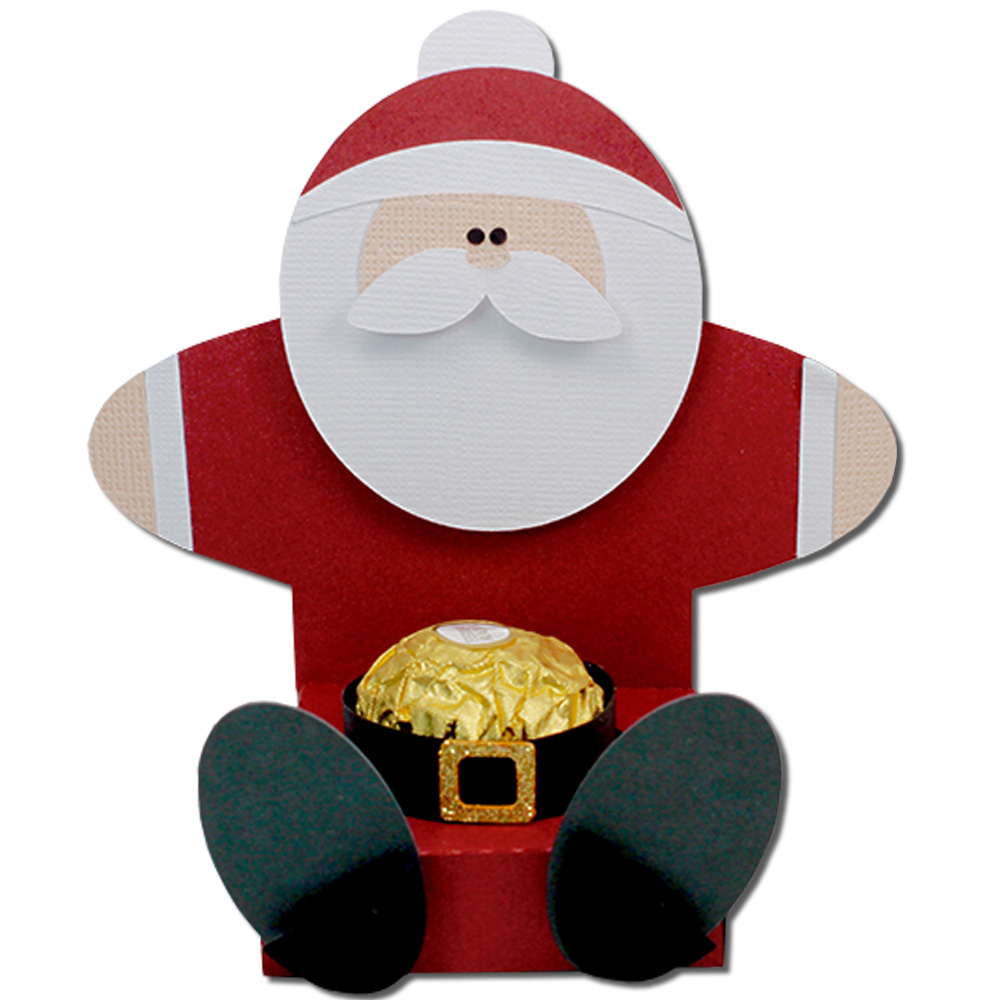
Santa Chocolate Belly Holder


Santa Chocolate Belly Holder-JMRush 
Approximate size: W 4.5 x D 2.25 x H 4.25”

This easy to construct chocolate holder is compatible with both 8X12 and 12X12 mats. A complete step by step picture tutorial can be found on my blog.

You can purchase the Silhouette design file here: https://www.silhouettedesignstore.com/artists/485222

You can purchase the SVG and Cricut compatible file here:https://www.jamieandjenn.com  Coming Soon:)

  1. Cut the design pieces. I used double sided card stock. (There is a solid santa piece in this file that is not shown in this image tutorial. It is used as a backing. Sorry. I forgot to cut this piece)
  2. Flip the box base over. 
  3. Apply glue to the side tabs and secure the bottom panel; aligning at the edges.
  4. Apply glue to the last tab and tuck under the snowman shape;align at the edge.
  5. Image of the backside. Apply glue to the backside of the santa shape (not shown in image) and secure the solid santa to the santa base; centering it.
  6. Flip the combined santa to the front. Glue the belt buckle to the center of the belt. Glue the belt so it forms a circular shape the size of the chocolate. Place the belt around the chocolate.
  7. Use a glue to attach the hat, face, hat brim pieces to the santa head. Use pieces of foam adhesive squares to attach the heels of the shoes to their shoe bases.
  8. Glue the hands and cuffs to the santa box base. Glue the tiny eyes to the combined santa head. Glue the tiny nose to the upper center of the mustache piece. Use a piece of foam adhesive squares to attach the combined mustache to the combined head.
  9. Glue the combined head to the combined santa base. Use foam adhesive squares to attach the feet to the box base:)

Tuesday, December 18, 2018

Mrs Claus Hug Gift Card Holder


Mrs Claus Hug Gift Card Holder-JMR
Approximate Card size: 4” x 6.75”

This card features character arms that open to release a hidden gift card section.This design is compatible with both 8X12 and 12X12 mats.


You can purchase the Silhouette design file here: https://www.silhouettedesignstore.com/artists/485222

You can purchase the SVG and Cricut friendly file here:https://www.jamieandjenn.com Coming Soon:)

1.Cut design pieces. I used double sided card stock.
2. Fold the card along score lines. Apply glue the bottom of the side tabs on the card base. Secure by folding upward toward the card base.
3. Glue the Large white head into place.
4. Glue the face into place. Glue the black belt just above the gift card section.
5. Curve the eyelashes and glue to the coordinating eye shapes on the face. Glue the mouth to the coordinating shape on the face.
6. Curve the 3 little green holly pieces and glue them into place; staggering them. Using pieces of adhesive foam square, attach the glasses. Glue the rectangular belt buckle on to the belt.
7. Using pieces of adhesive foam square, attach the nose. Glue the 3 tiny red berries to the combined holly piece.
8. Glue the hands and cuff pieces to the outside of the hands.
9. Insert gift card.
10. I used ribbon at the bottom to trim the card:).

11. Flip the card over. Glue the smaller hair piece to the coordinating shape on the backside:)

Wednesday, December 13, 2017

Santa Suspenders Gift Card Holder


Santa Suspenders Gift Card Holder- JMRush 
Approximate Card size: H 5.25” X W 4.5”

This is a double sided design that has a gift card pocket on the backside.This design is compatible with both 8X12 and 12X12 mats.

You can purchase the Silhouette design file here: https://www.silhouettedesignstore.com/artists/485222

(Coming Soon )You can purchase the SVG and Cricut file here:https://www.jamieandjenn.com


  1. Cut design pieces. I used double sided card stock.
  2. Glue the large black piece to the card base. Glue the small beige face to the santa head piece; centering at the eyes.
  3. Glue the combined santa head to the coordinating shape on the combined card base. Glue the gold buckle into place. Glue the red belly and bottom (w buttons) to the combined card base.
  4. Glue the mustache and red hat to the coordinating shape on the combined card base. Glue the hands into place and use a small piece of foam adhesive square to attach the nose. Glue the two small black suspenders into place. ( I have the hat puff ball attached in this image…which I changed to the top of the hat)
  5. Flip the combined cad base over. Fold the card base at the score lines. Apply glue to the side tabs on the card base and attach to the middle section. Allow to dry.
  6. Glue the buttons and other set of hands to the backside 
  7. Insert gift card.
  8. Tuck the top section into the pants.
  9. Use small pieces of foam adhesive squares to attach the hat’s puff ball to the top. ( there is a scalloped puff ball or a circle puff ball… which ever your prefer:) I used small adhesive dots to accentuate the eyes:)

Tuesday, December 12, 2017

Santa Flip Beard Gift Card Holder


Santa Flip Beard Gift Card Holder- JMRush 
Approximate Card size: H 4.75” X W 4.5”

This design has a gift card pocket under Santa’s beard and is compatible with both 8X12 and 12X12 mats.

You can purchase the Silhouette design file here: https://www.silhouettedesignstore.com/artists/485222

You can purchase the SVG and Cricut file here:https://www.jamieandjenn.com


  1. Cut design pieces. I used double sided card stock.
  2. Fold the card base at the score lines. Glue the largest red santa suit piece to the middle layer of the card base. Glue the small red santa suit piece to the black santa bottom piece; aligning at the bottom center and edges. Glue the square buckle into place. Glue the small face piece and mustache to the face base. ( There are small eye holes in the base to align the eyes).
  3. Apply glue to the side tabs on the card base and attach to the middle section. Allow to dry.
  4. Insert gift card.
  5. Glue the combined santa suit piece to the coordinating shape on the card front.
  6. Glue the combined Santa face to the top front of the card base; aligning at the small eye holes. Glue the hat into place.
  7. Use small pieces of foam adhesive squares to attach the nose and puff ball. 
  8. I used small adhesive dots to accentuate the eyes:)

Tuesday, November 8, 2016

Santa Hug Treat Box


Santa Hug Treat Box-JMRush
Approximate box size: W 3.” x D 2.25 x H .75”
(W 3” X H 3.75” including character)

This treat box features character arms that open to a small treat box. This design is perfect for Winter classroom parties or for small Christmas goodies.This design is compatible with both 8X12 and 12X12 mats.

You can purchase the Silhouette design file here: https://www.silhouettedesignstore.com/artists/485222


 1.Cut design pieces. (I used double sided card stock for the box base).
2. Glue the large oval beard piece to the coordinating shape on the box base. Fold the score lines on the box base.
3. Glue the smaller half moon piece to the top of the combined box base. Glue the larger half moon piece ( hat trim) just below. Glue the Santa face piece on.
4. Glue the nose to the mustache. Use foam adhesive squares to attach the combined mustache to the combined box base. Glue the eyes on.
5.  Apply glue to the two top tabs of the box base and secure them to the top (head) panel.
6. Apply glue to the bottom two tabs and secure them to the bottom panel creating a box. Glue the open rectangle buckle piece to the solid long rectangle belt piece.
7. Apply glue to the bottom tab of the center narrow strip section. Secure the center narrow strip tab to the backside of the inside of the box.
8. Glue the hands to the coordinating shapes on the box base. Glue the sleeve trim pieces beside the hand pieces. The hands tuck into the slots of the center strip. Glue the combined belt to the front side of the box:)

Tuesday, December 1, 2015

Santa Chimney Treat Box


Santa Chimney Treat Box-JMRush
Box size: W 2.25 x D 2 x H 3”

This treat box has a hinged top lid and can be filled with your favorite goodies. This design is compatible with both 8X12 and 12X12 mats.
You can purchase this design here: https://www.silhouettedesignstore.com/artists/485222


1.Cut design pieces.
2. Fold all score lines.
3.Apply glue to the bottom of the bottom tab. Secure to the bottom square panel.
4. Apply glue to the next set of tabs tabs and attach to the bottom square panel.
5.Repeat for the last tab.
6. Apply glue to the side tab and place inside. Your box should be complete after this step.
7. Center the full square piece on the top of the box, aligning the slot. Glue into place.
8. Center the open square piece on top of the full square and glue into place. Glue the boots and pant trim piece onto each leg segment.
9. Apply glue to the backside of one of the leg segments and glue the backside of the other leg segment to it. Be careful not to get glue on the tabs of the leg segments.
10. Glue the brick pattern piece onto the box and then glue the chimney top on top of it. 
11.Slide the tabs of the leg segments into the slot on the top of the box.
12. Separate the tabs on the inside of the box lid. Apply glue to the underneath side of each tab and glue onto the inside of the lid.
21. I finished the santa chimney box by adding a ribbon around the chimney:)

Monday, November 23, 2015

Santa Gift Tag

Santa Gift Tag-JMRush

This design is compatible with both 8X12 and 12X12 mats.
You can purchase this design here: https://www.silhouettedesignstore.com/artists/485222


Santa Hug Gift Card Holder


Santa Hug Gift Card Holder-JMRush
Approximate Card size: 4” x 5.75”


This card features character arms that open to release a hidden gift card section.This design is compatible with both 8X12 and 12X12 mats.

You can purchase the SVG and Cricut file here:

You can purchase the Silhouette design file here: https://www.silhouettedesignstore.com/artists/485222

1.Cut design pieces. I used double sided red cardstock for the card base:)
2. Fold the card along score lines.
3. Apply glue the bottom of the side tabs on the card base. Secure by folding upward toward the card base.
4.Glue the Oval head piece and the hat sliver on top. Glue on the Santa’s belt and buckle.
5.Glue on Santa’s face.
6. Using foam adhesive squares, place and attach Santa’s mustache. Using glue, attach the eyes and nose.
7. Glue Santa’s hand to the arm wings and then glue on the trim pieces to each hand.
8. Place gift card.
9. Tuck Santa’s hands into the cut slots in the card base.

10. Glue a ribbon in the center of the slots to finish:)

Monday, November 16, 2015

Santa’s Bag Pocket Gift Card Holder

Santa’s Bag Pocket Gift Card Holder-JMRush
Card size: W 4.25" X 5.5”

This pocket card has a removable insert that will hold a standard size gift card. This design is compatible with both 8X12 and 12X12 mats.

You can purchase the SVG and Cricut file here:


You can purchase the Silhouette design file here: https://www.silhouettedesignstore.com/artists/485222


1.Cut design pieces.
2. Fold all score lines.
3.Apply glue to the tabs on the card base and secure to the inside of the opposite side.
4. Apply glue to the side and bottom tab of the insert piece. Secure to the inside of the opposite side.
5. Apply glue to the backside of the present panel. 
6. Secure to the front of the insert piece. The small square piece is glued to the middle of the bow.
7.Glue the letters to the lettering bases and attach the belt buckle to the belt piece. (I used foam adhesive squares for the buckle.)
8.Glue the belt onto the card base. Attach the letters onto the card base. (I again used foam adhesive squares for the lettering.)
9.This is what your designs should look like:)
10. The gift card fits in between the layers of the insert.
11. Finish by adding a ribbon.

Monday, October 26, 2015

Santa Cone Container


Santa Cone Container-JMRush

Basket size: W 4" X  H 2.25”
Santa Size (approximate): W 6” X H 7”

This Santa Cone Treat container can be filled with goodies for a gift or used as a center piece for your Christmas celebrations. 20” of 1/4” ( or smaller width) ribbon or twine is needed to complete the basket. This design is compatible with 8x12 or 12X12 mats.


  1. Cut the design pieces.
  2. Pre-fold all score lines.
  3. Using 20” of 1/4” or smaller ribbon or twine, lace it through the holes of the Octagonal design piece to create a basket. Tie a bow to secure.
  4. Starting with the largest curved body piece, insert the tab into the slot.
  5. Apply glue to the inside of the cone on the inside of the tab.
  6. Secure into place. Repeat for each Curved cone body section.
  7. Repeat for the scalloped body section.
  8. Repeat for the face cone section.
  9. Repeat for the hat scalloped section.
  10. Roll the triangular top piece into a cone shape.
  11. Apply glue and secure, aligning the edges.
  12. Glue the top fluff piece to the top of the hat.
  13. Glue the belt buckle an button into place.
  14. Tuck the hand pieces under the scalloped body section and glue into place. Eyes and nose also is glued into place.
  15. Glue the hat section into place.
  16. Now that all of the design pieces are in place we can glue the cone sections together.
  17. Glue the scalloped hat section to the face section, Making sure all the seams in the back align.
  18. Glue the face cone section to the top of the scalloped Body section, aligning the seams in the back.
  19. Apply glue to the inside of the largest scalloped edge curved cone body section and secure it to the top of the largest straight bottom section. (Make sure that the seams align in the back).
  20. Your Santa is complete. Fill him with goodies to give as a gift or use him as a festive Holiday decoration:)